Dreamsical Nolia: A Display Font for Ethereal Web Design
Dreamsical Nolia is a display font that brings a touch of whimsy and elegance to digital projects. Inspired by the ethereal beauty of clouds, this handwritten font offers a unique visual identity that can elevate brand tone and user experience. As a web designer or digital product creator, understanding how a font like Dreamsical Nolia performs in real layouts is essential for crafting effective online experiences.
Visual Characteristics and Digital Appeal
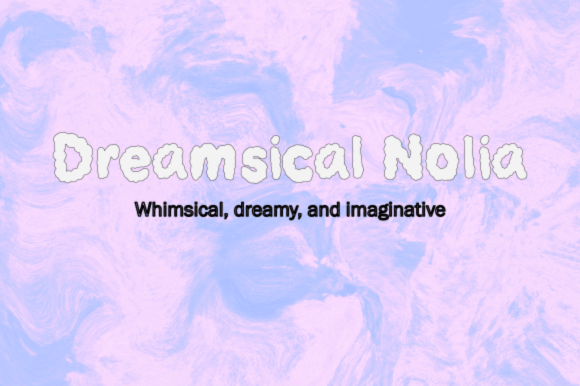
Dreamsical Nolia features a flowing, organic script that evokes a sense of dreaminess and creativity. Its character design is both delicate and expressive, making it ideal for projects that aim to convey warmth, artistry, and a personal touch. The font's irregularity adds charm while maintaining readability, which is crucial for digital typography.
The personality of Dreamsical Nolia leans toward the whimsical and artistic, making it a great fit for creative brands, boutique stores, and content-focused websites. Its style blends the elegance of serif fonts with the fluidity of script fonts, offering a versatile option for various design applications.
Applying Dreamsical Nolia in Web Design
Dreamsical Nolia is best suited for display purposes such as headers, hero sections, call-to-action buttons, and decorative accents. Its visual weight makes it ideal for short phrases and key messages that need to stand out on a page. When used thoughtfully, it can guide users' attention and enhance the overall hierarchy of your layout.
For instance, using Dreamsical Nolia as a headline on a creative portfolio site can immediately communicate the brand’s aesthetic. On an online store, it can be paired with a clean sans-serif body font to create contrast and balance. In digital ads or social media graphics, its charm can help capture attention and drive engagement.
Readability and Layout Considerations
While Dreamsical Nolia is visually striking, it's important to consider its readability in different contexts. On mobile screens, ensure that the font size is large enough to maintain legibility. Avoid using it for long blocks of text, as its ornate style may reduce scanning efficiency.
When placing Dreamsical Nolia on dark backgrounds, use light-colored text to maintain contrast. Conversely, on light backgrounds, darker tones will help the font pop. For image overlays, test the font against varying levels of opacity to ensure it remains readable and impactful.
Font Pairing and Brand Identity
To achieve a balanced design, pair Dreamsical Nolia with a simple sans-serif or serif font for body copy. This combination creates a clear visual hierarchy and improves overall readability. For example, pairing it with a modern sans-serif like Montserrat or a classic serif like Georgia can provide a professional yet creative feel.
For editorial or branding purposes, consider using Dreamsical Nolia alongside a more structured typeface to add depth and interest. This approach works well for blog headers, course sales pages, and branded web content where both style and clarity are important.
Practical Use Cases
- Creative Portfolio Sites: Use Dreamsical Nolia for project titles and section headings to reflect a personal, artistic brand.
- Boutique Online Stores: Apply it to product names and promotional banners to create a unique shopping experience.
- Coaching Websites: Incorporate it into welcome messages and service descriptions to convey warmth and approachability.
- Product Landing Pages: Use it for feature highlights and value propositions to draw attention to key points.
- Blog Headers: Employ it for post titles to set a playful and engaging tone for readers.
- Digital Brand Kits: Integrate it into logo text and brand assets to reinforce a cohesive visual identity.
Technical Considerations
Before implementing Dreamsical Nolia, check if it includes webfont support, alternate styles, and multilingual options. Ensure that the font files are optimized for fast loading times, especially for high-traffic websites. Also, verify that the font licensing allows for commercial use across various platforms, including websites, landing pages, and digital templates.
Consider using CSS @font-face or a web font service like Google Fonts to easily integrate Dreamsical Nolia into your projects. This ensures consistent rendering across devices and browsers, enhancing the user experience.
Conclusion
Dreamsical Nolia is more than just a decorative font—it's a powerful tool for shaping brand identity and improving user engagement. By understanding its strengths and limitations, you can effectively leverage it in your web design projects to create visually compelling and functional digital experiences. Whether you're designing a creative portfolio, a boutique store, or a course sales page, Dreamsical Nolia can help you stand out in a crowded digital landscape.